Introduction
A restaurant’s daily operations involve much more than preparing meals. Staff must welcome guests, manage bookings, organize seating, and respond to changing plans. When these tasks work together, the restaurant can deliver a smoother dining experience.
Problems often begin when employees lack clear booking information. A guest may request a quiet table, a large group may arrive together, or several reservations may overlap. These situations can put pressure on staff and leave customers waiting.
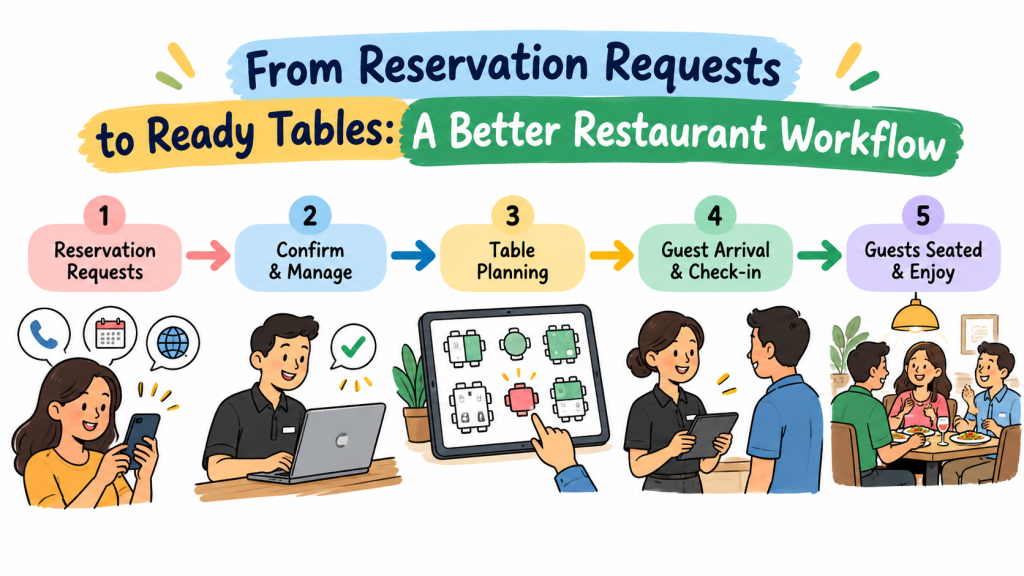
Restaurants can handle these challenges by building a reliable workflow. A workflow explains how the team moves from receiving a booking to welcoming guests and preparing tables for the next visit.
The goal is not to create more rules. Instead, restaurants should make everyday tasks easier to understand and complete. This guide explores ways to improve reservation handling, coordinate employees, organize seating, and create a more dependable guest experience.
Turn Every Booking Request into a Clear Record
A reservation request starts the guest journey. If staff record the wrong date, time, or party size, the mistake can affect the entire service.
Restaurants should create one consistent method for recording booking details. Employees need to capture the information required to manage the reservation and prepare suitable seating.
For example, a guest may book a table for four but later call to add two more people. If the team updates the reservation record, the host can check whether the original table still works. Without that update, staff may discover the problem only when the group arrives.
A useful booking record should contain:
- The guest’s name and contact details.
- The requested date and arrival time.
- The number of people in the party.
- Relevant seating requests.
- Any agreed changes to the reservation.
- Notes that help the team prepare for the visit.
Staff should review each entry before confirming the booking. They should also update the record whenever the guest changes their plans.
Accurate records give the team a reliable starting point for the rest of the process.
Give Guests Clear Information Before Their Visit
Guests feel more confident when they know what to expect. A confirmation should explain the important details without making the message difficult to read.
Restaurants can confirm the booking date, arrival time, party size, and contact information. They can also explain how guests can request changes or cancel their reservations.
When a restaurant follows a late-arrival policy, it should explain that policy before the visit. Clear expectations help guests plan their journey and reduce confusion at the entrance.
Restaurants can use several communication methods, depending on their needs. These may include email, text messages, telephone calls, or booking confirmations from a reservation platform.
The team should use a consistent process across these channels. Staff should also check that the contact details belong to the correct guest before sending booking information.
Clear communication helps prevent avoidable misunderstandings. It also gives customers a better impression of the restaurant before they arrive.
Design Seating Plans Around Real Service Conditions
A seating plan should help the restaurant serve guests comfortably. It should not focus only on fitting the largest possible number of people into the dining room.
Managers need to consider table sizes, group requirements, walking space, and upcoming reservations. They should also consider how quickly staff can prepare tables between visits.
Imagine a restaurant with several small tables and a few larger ones. A couple may fit comfortably at a small table, while a family group may need a larger space. Assigning tables with these needs in mind helps the restaurant make better use of its dining area.
A practical seating plan should account for:
- Group size and suitable table capacity.
- Space between tables and clear walking routes.
- Access needs and relevant seating requests.
- Reservations scheduled close together.
- Tables that staff can combine safely when necessary.
Managers should also review the plan when the booking schedule changes. A fixed seating arrangement may not work equally well for every service period.
Good planning balances table use with guest comfort and employee safety.
Prepare Tables Before the Rush Begins
A table needs more than an empty seat before staff can welcome new guests. Employees may need to clean the surface, replace settings, arrange chairs, and check the surrounding area.
When the team waits until guests arrive to complete these tasks, the restaurant can develop a queue even when tables appear available.
Managers can reduce this pressure by building table preparation into the service routine. Staff should review upcoming reservations and prepare suitable areas before expected arrival times.
A clear handover between the cleaning team, servers, and host can also help. Once a table meets the restaurant’s readiness standards, the responsible employee should update its status.
Restaurants can use a simple readiness checklist:
- Confirm that the table is clean.
- Check chairs and table settings.
- Remove leftover items from the previous visit.
- Ensure that the surrounding area remains clear.
- Update the table status when preparation ends.
These steps help staff avoid assigning tables before they are ready. They also make the seating process easier to manage during busy periods.
Make Table Turnover More Predictable
Table turnover describes how often a restaurant seats new guests at its tables during a service period. Restaurants need to manage turnover carefully without making diners feel rushed.
Managers can study their usual dining patterns to estimate how long different bookings may occupy tables. These estimates should guide planning rather than force every guest to finish within the same time.
For instance, a quick lunch service may follow a different pattern from a family dinner or a celebration. The restaurant should consider its menu, service style, and customer expectations when planning reservation times.
Staff can improve turnover planning by preparing tables promptly after guests leave. They can also communicate when a table remains occupied longer than expected and review how that delay affects upcoming reservations.
Managers should avoid scheduling bookings too closely when the restaurant cannot support them. A realistic schedule helps the team maintain service quality and reduces unnecessary pressure.
The aim is to keep operations moving while allowing guests to enjoy their meals comfortably.
Build a Reliable Process for Walk-In Guests
Not every customer plans a visit in advance. Some guests decide where to eat while exploring a neighborhood, finishing work, or spending time with friends.
Restaurants can welcome these customers while protecting existing reservations. The team needs a clear way to check availability and explain the next steps.
When a table is ready, staff can seat the walk-in party if the assignment does not conflict with upcoming bookings. When no suitable table is available, the host can offer an estimated waiting time.
A well-organized walk-in process should include:
- Checking the current table status.
- Reviewing upcoming reservation times.
- Recording guests who agree to wait.
- Sharing a realistic waiting estimate.
- Updating the waiting list as tables become available.
Staff should not promise a table simply because one looks empty. The table may belong to an upcoming reservation or still need preparation.
Restaurants can also review walk-in demand to understand busy periods. This information may help managers adjust staffing, table assignments, or reservation availability.
Create a Clear Response to Cancellations
Cancellations are a normal part of restaurant operations. Guests may change their plans because of travel delays, personal commitments, or unexpected events.
A clear cancellation process helps staff update the booking record and review the newly available table. It also gives other customers a chance to reserve that time when suitable.
Restaurants should make cancellation instructions easy to find. Guests should know how to contact the team and whether any special terms apply to their booking.
For larger parties or special dining events, the restaurant may choose different booking conditions. Staff should explain those conditions before guests confirm their reservations.
Managers can review cancellation patterns to understand when changes happen most often. They can then decide whether reminders, clearer policies, or other practical steps might help.
The key is to handle cancellations consistently. Accurate updates protect the reservation schedule and help the team make better seating decisions.
Keep the Waitlist Organized During Busy Periods
A waitlist gives staff a clear record of guests who want a table when the restaurant has no immediate availability.
Without an organized list, employees may forget guests, lose track of arrival order, or give conflicting waiting estimates. These problems can damage trust even when the restaurant works hard to provide good service.
The host should record the details needed to manage each waiting party. Staff should also explain how the restaurant handles table availability and whether the estimate may change.
A useful waitlist process includes:
- Recording the party size and arrival time.
- Keeping contact details when needed.
- Checking table availability regularly.
- Updating guests when delays become significant.
- Removing entries when guests leave or receive a table.
Restaurants should provide realistic estimates rather than guarantee an exact seating time they cannot control.
When a suitable table becomes available, staff should follow the restaurant’s stated seating policy. Clear rules help employees make consistent decisions and reduce disputes among waiting guests.
Choose Technology That Solves Everyday Problems
Restaurant technology should make daily work easier. A system that adds too many steps or confuses employees may create more problems than it solves.
Reservation software can help restaurants organize booking information and coordinate table assignments. Depending on the platform, it may also offer online booking, waitlist tools, reminders, or reports.
Before choosing a solution, owners should identify the tasks that consume the most time or cause the most mistakes.
For example, a small restaurant may mainly need a shared reservation calendar. A larger restaurant may need more detailed table management and support for several booking channels.
Use these questions to guide the decision:
| Selection area | What restaurant owners should check |
|---|---|
| Booking access | Can guests request tables through suitable channels? |
| Record management | Can staff find and update reservations easily? |
| Seating support | Can the team organize tables and party sizes? |
| Waitlist handling | Can employees track guests who are waiting? |
| Staff training | Can new employees learn the system quickly? |
| Cost | Does the price fit the restaurant’s budget? |
| Support | Can the restaurant get help when needed? |
Owners should confirm the current features, pricing, and service terms directly with each provider. They should also test the workflow before introducing a system across the team.
Technology works best when it supports clear procedures and accurate information.
Explore DineGlobe for Restaurant Reservations
Restaurant owners who want to improve booking management can compare platforms that support their operational needs.
DineGlobe focuses on restaurant reservation and booking management. Restaurant teams can explore its website to understand the available services and decide whether the platform fits their workflow.
Visit DineGlobe to learn more.
Before selecting DineGlobe or another provider, review the current features, pricing, setup requirements, and support options. Consider how the system would fit the restaurant’s booking process and how easily employees could use it during busy shifts.
A suitable platform should help staff keep reservation information organized and make daily tasks easier to manage. Restaurant owners should base their decision on verified product details and their own business requirements.
Train Employees to Handle Reservations Consistently
A restaurant may have good booking software and a thoughtful seating plan, but staff still need clear instructions. Employees must know how to use the system and respond to common situations.
Managers should explain each person’s responsibilities. For example, the host may record bookings and assign tables, while another employee prepares the dining area. Staff should also know who handles complaints, late arrivals, and special requests.
Short training sessions can help employees learn the process. Managers can use common examples to explain how staff should respond when a party size changes or a table becomes unavailable.
Before service, the team can review important bookings and possible challenges. During service, employees should share updates quickly instead of assuming everyone already knows about a change.
Managers should invite staff to suggest improvements. Employees who handle reservations each day may identify confusing steps or repeated problems.
Consistent training helps the team deliver more dependable service across different shifts.
Use Guest Feedback to Find Weak Points
Guest feedback can reveal problems that booking records alone may not show. Customers may report unclear confirmation messages, long waits, confusing cancellation rules, or seating that does not match their requests.
Restaurants should review this feedback without treating every complaint as proof of a wider problem. Instead, managers can look for repeated themes and compare them with operational records.
For example, several complaints about waiting times may point to a scheduling problem. Repeated comments about booking changes may suggest that staff need clearer instructions or better access to reservation records.
Managers can improve the process by:
- Reviewing common guest concerns.
- Checking whether the problem happens repeatedly.
- Discussing possible causes with staff.
- Testing a practical change.
- Reviewing feedback after the change.
Restaurants should focus on improvements that matter to guests and employees. Small changes can produce better results when they address a real problem.
Common Signs That Your Booking Process Needs Attention
A restaurant may need to review its reservation workflow when the same problems appear repeatedly.
Guests Wait Even When Tables Look Empty
Some tables may still need cleaning or may belong to upcoming reservations. Staff should check table status and explain the reason for delays when appropriate.
Employees Keep Asking for Booking Details
Repeated questions may suggest that reservation records lack useful information or that staff cannot find the details quickly. Managers should review how the team records and shares booking information.
Walk-In Guests Receive Different Answers
Conflicting waiting estimates can confuse customers. Staff need a shared process for checking availability and communicating delays.
Table Assignments Change at the Last Minute
Frequent changes may point to poor planning, incorrect party sizes, or an unclear seating process. Managers should identify the cause before adjusting the floor plan.
Guests Miss Important Booking Instructions
Customers may overlook cancellation terms or arrival policies when messages lack clarity. Restaurants should review confirmation wording and make key details easy to find.
Recognizing these signs early helps managers improve the process before the problems affect more guests.
Frequently Asked Questions
1. What is a restaurant reservation workflow?
A restaurant reservation workflow describes how staff handle a booking from the first request through guest arrival and seating. It helps employees follow consistent steps and manage changes.
2. How can restaurants improve booking accuracy?
Restaurants can use a consistent booking process, check important details before confirmation, and update records whenever plans change. Shared information also helps prevent duplicate or incorrect bookings.
3. Why should restaurants prepare tables before guests arrive?
Early preparation helps staff seat guests more efficiently. It also reduces the risk of sending customers to tables that still need cleaning or setup.
4. How can restaurants balance reservations and walk-ins?
Staff should review upcoming bookings before assigning tables to walk-in guests. They should also provide realistic waiting estimates when suitable tables are unavailable.
5. What should a restaurant include in its waitlist?
A waitlist should record the details needed to identify each party, manage arrival order, and contact guests when appropriate. Staff should update it as tables become available.
6. How can restaurants handle cancellations?
Restaurants should record cancellations promptly and review the newly available time slot. Clear cancellation instructions help guests understand how to change their plans.
7. What should owners consider when choosing reservation software?
Owners should compare booking features, table management tools, ease of use, pricing, and support. They should choose a system that solves real operational problems.
8. How does staff training improve reservation management?
Training helps employees understand booking procedures, table assignments, and communication rules. It also prepares them to respond consistently when reservations change.
9. Which information can help restaurants improve their booking process?
Reservation volume, waiting times, no-show rates, cancellation patterns, and guest feedback can help managers identify recurring problems. The team can then test changes and review the results.
10. Where can restaurant owners learn about DineGlobe?
Restaurant owners can visit DineGlobe to explore the platform. They should review the current services and terms to decide whether it meets their needs.
Final Thoughts
Restaurant reservation management works best when every step has a clear purpose. Accurate records help staff prepare for guests, sensible seating plans protect comfort, and clear communication reduces confusion.Restaurant owners can begin by reviewing how their teams record bookings and prepare tables. They can then improve their waitlist process, train employees, and explore technology that supports their daily work.No single method will suit every restaurant. The right approach depends on the dining room, customer needs, staffing, and booking volume.By reviewing problems regularly and making practical changes, restaurant teams can create a more dependable workflow. That effort helps employees manage busy periods and gives guests a smoother start to their dining experience.
